 Ambarussa
Ambarussa
Ambarussa
Two files, one name. Are they the same?
A duplicate finder for the Mac that proves copies byte for byte, moves the ones you choose to the Trash, and never sends anything about your files anywhere.
Due file, un nome. Sono lo stesso file?
Un cercatore di duplicati per Mac che verifica le copie byte per byte, sposta nel Cestino quelle che scegli tu e non invia mai nulla dei tuoi file da nessuna parte.
Finding duplicates is easy. Being sure — and staying careful with the only copy — is the point.
Same name and size is only the start: every copy is checked byte for byte (BLAKE3). Files that only look alike are shown apart, and can't be selected.
Every set keeps at least one file. Before anything moves, each copy and the one you keep are checked again; anything changed since the scan is left alone.
Copies go to the Trash, and the whole move can be undone with ⌘Z. Nothing is ever deleted for good.
Finder copies on APFS share their blocks, and hard links are one file with two names. Ambarussa tells you when removing a copy frees nothing.
List the folders to compare and put the originals first: copies elsewhere are suggested for the Trash. Or keep the oldest, the newest, the shortest path.
Reads in parallel on SSDs and one file at a time on spinning disks. Files kept only in iCloud are skipped, never downloaded.
Trovare i duplicati è facile. Esserne certi — e avere cura dell'unica copia — è il punto.
Stesso nome e stessa dimensione sono solo l'inizio: ogni copia è confrontata byte per byte (BLAKE3). I file solo simili sono mostrati a parte e non si possono selezionare.
Ogni gruppo mantiene almeno un file. Prima di spostare qualcosa, ogni copia e quella da mantenere vengono ricontrollate; ciò che è cambiato dopo la scansione resta dov'è.
Le copie finiscono nel Cestino, e l'intero spostamento si annulla con ⌘Z. Nulla viene mai cancellato per sempre.
Le copie del Finder su APFS condividono i blocchi, e gli hard link sono un file con due nomi. Ambarussa ti dice quando togliere una copia non libera nulla.
Elenca le cartelle da confrontare e metti per prime quelle con gli originali: le copie altrove sono proposte per il Cestino. Oppure mantieni la più vecchia, la più recente, il percorso più corto.
Legge in parallelo sugli SSD e un file alla volta sui dischi meccanici. I file presenti solo su iCloud vengono saltati, mai scaricati.
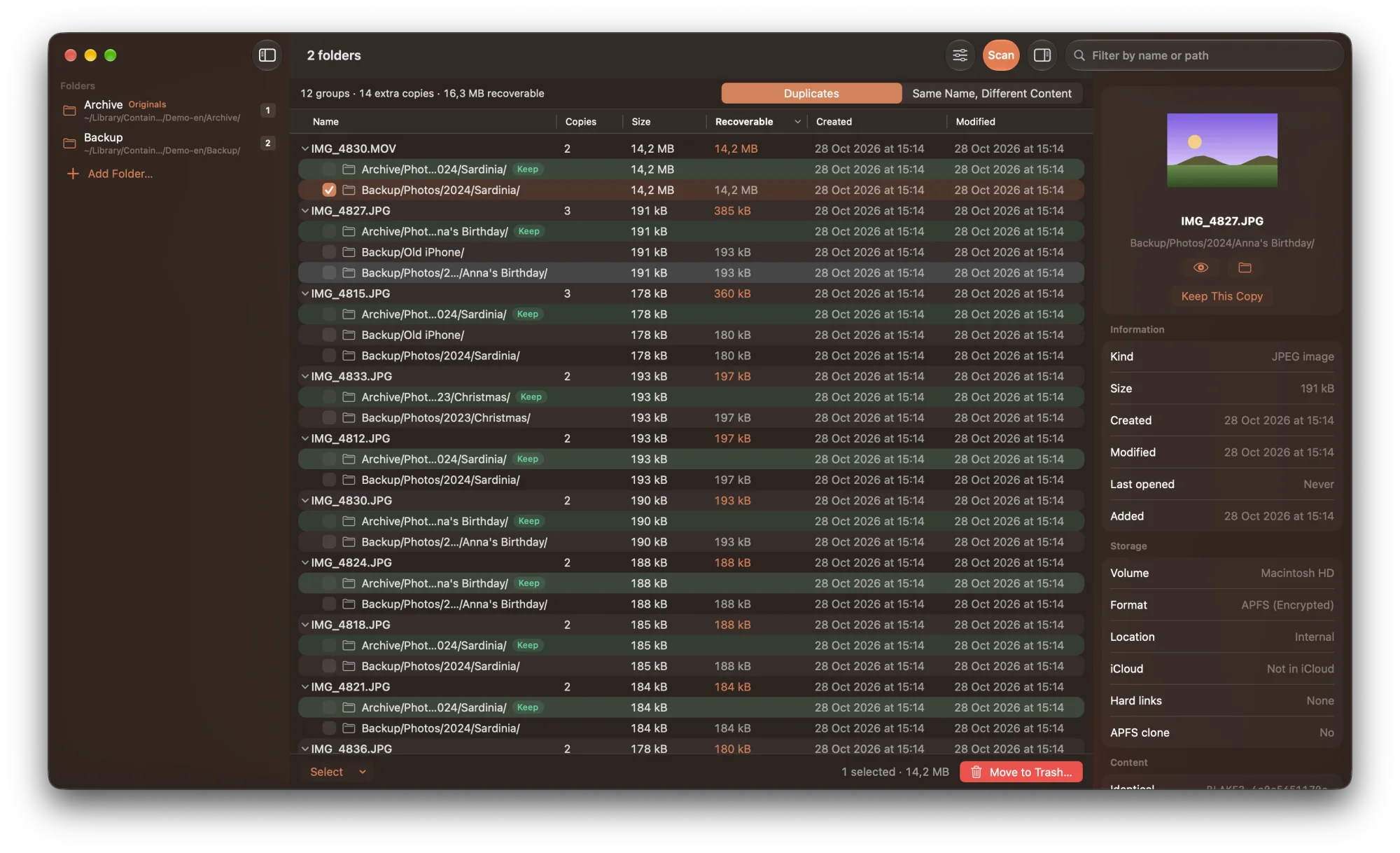
Copies grouped by file, the one to keep in green, the ones you tick in russet, every detail in the inspector.
Le copie raggruppate per file, quella da mantenere in verde, quelle che spunti in ruggine, ogni dettaglio nell'ispettore.
The same engine ships as a command-line tool, ambarussa: same groups, same checks, same rules about the last copy.
Lo stesso motore è anche uno strumento da riga di comando, ambarussa: stessi gruppi, stessi controlli, stesse regole sull'ultima copia.
$ ambarussa scan ~/Pictures /Volumes/Backup
IMG_0415.MOV  (5.10 MB)
  KEEP       2026-10-27 15:15:09  ~/Pictures/2024/IMG_0415.MOV
  duplicate  2026-10-27 15:15:09  /Volumes/Backup/Pictures/2024/IMG_0415.MOV

IMG_0412.HEIC  (2.40 MB)
  KEEP       2026-10-27 15:15:09  ~/Pictures/2024/IMG_0412.HEIC
  duplicate  2026-10-27 15:15:09  /Volumes/Backup/Old/IMG_0412.HEIC
  duplicate  2026-10-27 15:15:09  /Volumes/Backup/Pictures/2024/IMG_0412.HEIC

SAME NAME AND SIZE, DIFFERENT CONTENT:
notes.pdf  (180 kB)
  differs    2026-10-27 15:15:09  ~/Pictures/2024/notes.pdf
  differs    2026-10-27 15:15:09  /Volumes/Backup/Old/notes.pdf

Duplicate groups: 2  |  Extra copies: 3  |  Recoverable space: 9.90 MB
--trash --dry-run prints exactly what would move, and moves nothing.
--trash asks before moving anything; scripts must add --yes.
--json and --jsonl for scripts, --keep for the keep rule.
--trash --dry-run mostra esattamente cosa verrebbe spostato, senza spostare nulla.
--trash chiede conferma prima di spostare; gli script devono aggiungere --yes.
--json e --jsonl per gli script, --keep per la regola di mantenimento.
Built around one idea: be sure before touching a file.
A native app: Quick Look, Show in Finder, the menu bar and the keyboard, light and dark mode, VoiceOver. Folders you choose, inside the macOS sandbox.
Ambarussa only calls files identical when their content matched, checks them again before moving, and never touches the last copy of anything.
No account, no analytics, no crash reports. The app connects only to check for updates; your files, their names and the results never leave the Mac.
In Tolkien's legendarium, Ambarussa is the name both of Fëanor's twin sons were given — two people, one name. Two files, one name: are they the same?
Costruita attorno a un'idea: esserne certi prima di toccare un file.
Un'app nativa: Quick Look, Mostra nel Finder, la barra dei menu e la tastiera, modalità chiara e scura, VoiceOver. Solo le cartelle che scegli, nella sandbox di macOS.
Ambarussa dice che due file sono identici solo se il contenuto coincide, li ricontrolla prima di spostarli e non tocca mai l'ultima copia di nulla.
Nessun account, nessuna statistica, nessun rapporto sugli arresti. L'app si collega solo per controllare gli aggiornamenti; i tuoi file, i loro nomi e i risultati non lasciano mai il Mac.
Nel legendarium di Tolkien, Ambarussa è il nome dato a entrambi i figli gemelli di Fëanor — due persone, un nome. Due file, un nome: sono lo stesso file?